
How AI is Changing the Way ForeFront’s Solution Architects Work
By the ForeFront Solution Architecture Team
Every Salesforce implementation is, at its core, a change management project. The technology is the vehicle. What a business is really navigating is how work gets done differently, who makes which decisions, and whether the people closest to the process trust what they’re being handed. AI hasn’t changed any of that. What it has changed is how well-equipped we are to help organizations prepare for it.
Most of the AI conversation in manufacturing right now focuses on products: Agentforce in service, Einstein in forecasting, voice in the field. The bigger shifts are upstream — in the work a solution architect does before the build even starts, and in how that early work positions clients to lead their own change.
A solution architect’s job is mostly context work. We pull together what the client needs, what the platform can do, what their other systems demand, and how much change the business can realistically absorb. Then we design something that fits.
When context is missing, the cost shows up in adoption — rework, scope creep, or a solution that looks right on paper but breaks down when real users encounter it for the first time.
That context work used to take a ton of legwork. We spent hours combing through technical docs from various vendors, tracking down the one person who had worked with a specific ERP before, and building relationships across half a dozen platforms so we had someone to call when a question came up.
AI hasn’t replaced any of that. But it has changed how fast we can pressure-test what we already know — and how much we know before we walk into the room. Here’s a look at five ways AI is reshaping how ForeFront’s Solution Architect team works, and what that means for manufacturers navigating organizational change:
- 1
Shifting discovery from education to design
- 2
Showing options in client orgs, not slide decks
- 3
Delivering exceptional UX/UI and headless experiences
- 4
Designing across systems you don’t have access to
- 5
Catching gaps before they show up in testing
We’ll also share what we’ve learned along the way and what this all means for manufacturers who want to use AI as a driver of organizational change.
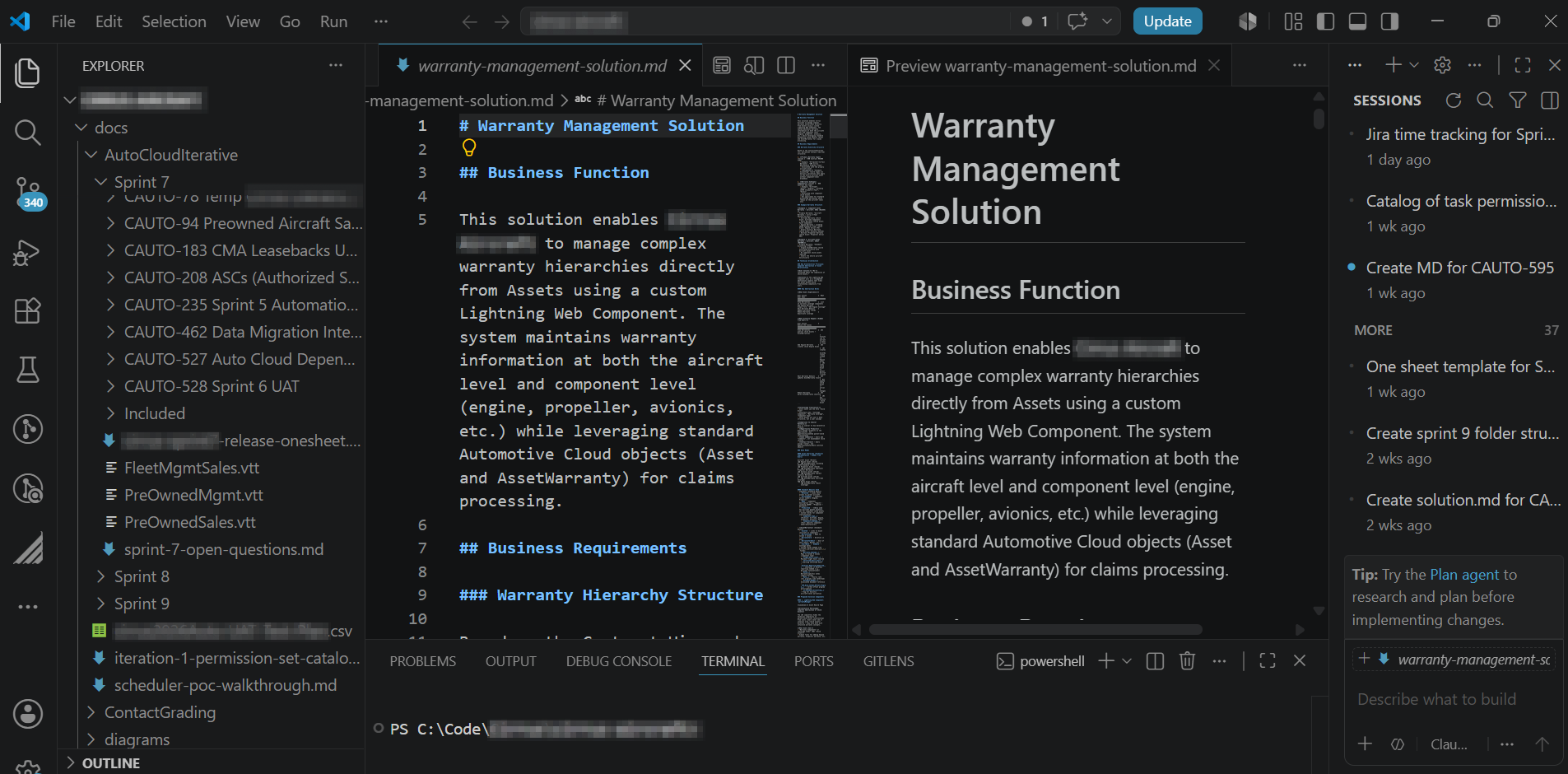
ForeFront’s Solution Architects use AI to support solution brainstorming, gap analysis, and organizational change readiness across every phase of delivery.
1. Shifting discovery from education to design
Discovery used to look the same on every Revenue Cloud migration: a week of sessions walking the client through their own managed package, decoding what the previous implementer did, mapping which customizations were still in use, and which had quietly been abandoned. While most of that work is necessary, it doesn’t move the project — or the organization — forward.
Christian Taylor, one of our Solution Architects, is leading the effort on a managed package analyzer that does that mapping in advance. AI surfaces heavy customizations, technical complexity, security and compliance flags, and integration touchpoints, then packages it into a current-state map before the first call.
That changes what discovery is actually for. Instead of decoding the org, we spend our time understanding the business: what’s working, what frustrates the team, and where the biggest opportunities for change are. You can’t plan a transition you don’t understand. The managed package analyzer is, at its core, a change management tool — it gives us a complete picture of a client’s current state before we ever recommend a path forward.
Manufacturing migrations typically aren’t just about software. They’re about workflow alignment, integration design, and the human side of change — and those are the parts that still need a human in the room.
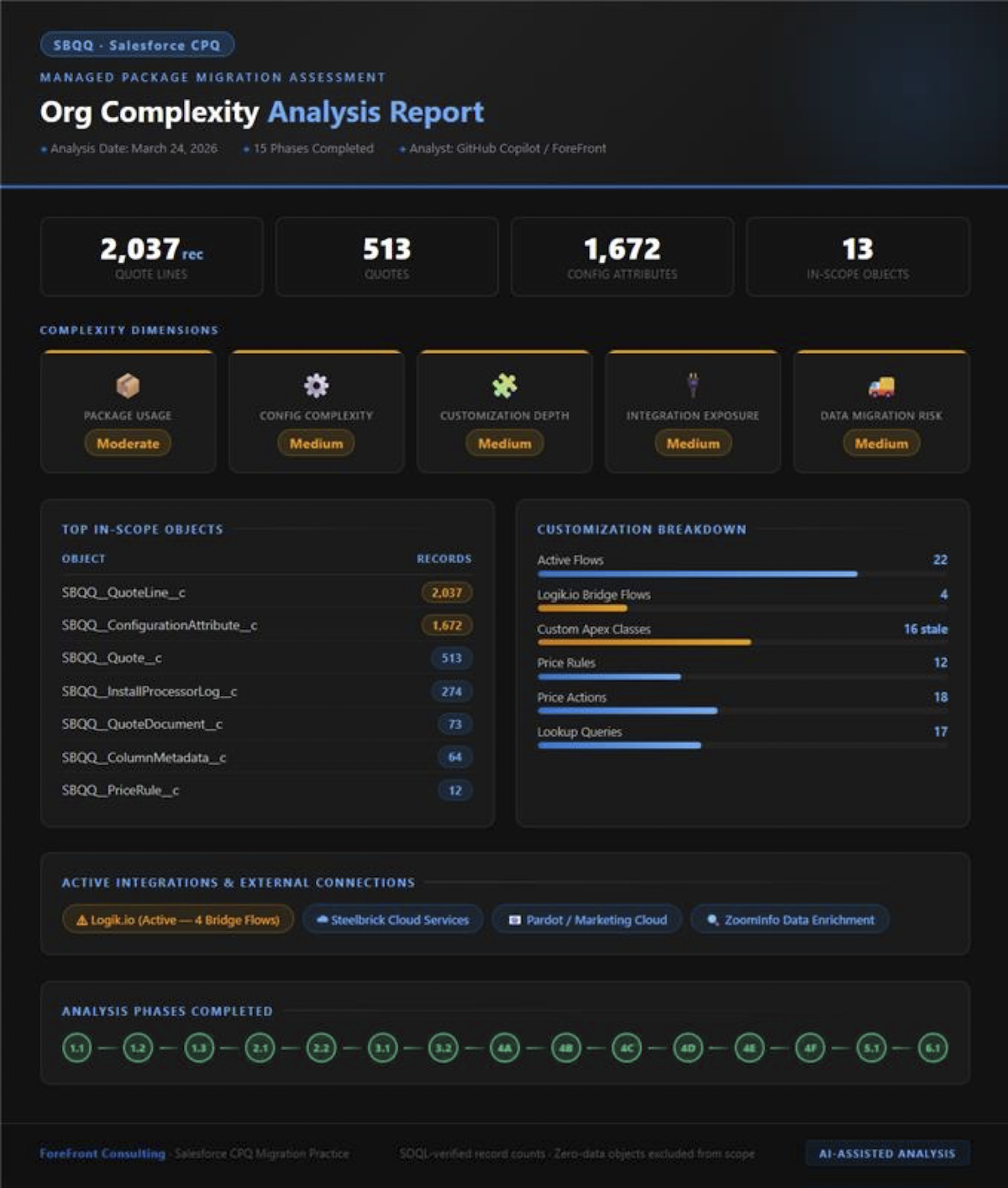
Managed package analyzer output showing org complexity and risk areas
2. Showing options in client orgs, not slide decks
Bryan Land, one of our SAs, has been using AI to build proofs of concept directly in client orgs. A recent example: a customer hierarchy use case where bill-to and ship-to architecture kept tripping the client up. He scoped the requirement, wrote the prompt, and had a working Lightning Web Component (LWC) the same day.
The other half of POC time used to go to data setup:
- Build a CSV, fix the formatting
- Upload through Data Loader
- Fix the records that failed
- Rinse and repeat.
Bryan now has AI generate anonymized data that mirrors the client’s actual schema and record patterns. The data behaves like the real thing in a demo.
For clients, that means the conversation can happen on real screens with real data instead of mockups and assumptions. When stakeholders can see and interact with exactly what they’re approving, alignment is more durable — and the change management work that follows has a stronger foundation.
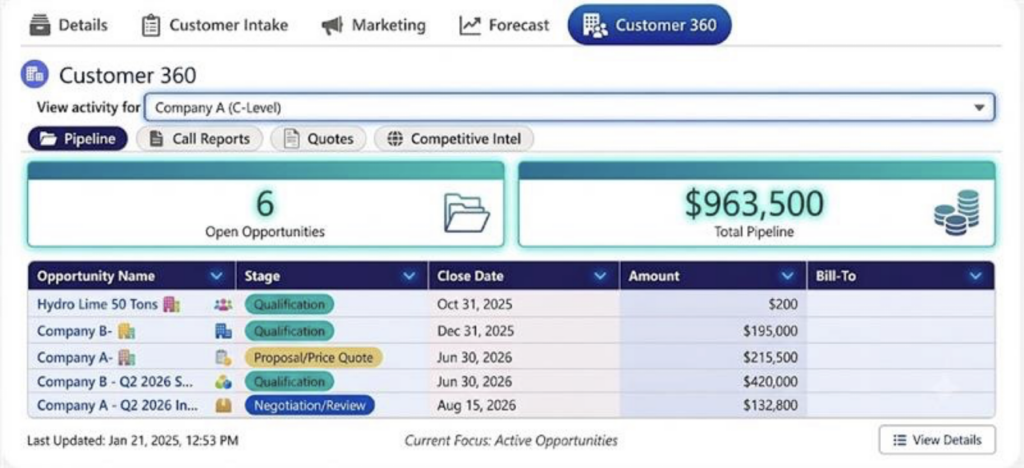
LWC POC built same-day, ideally with the prompt visible
3. Delivering exceptional UX/UI and headless experiences
Some of the most meaningful shifts in our work shows up in experience design.
James Goodman, a Salesforce Practice Director at ForeFront, prototyped a full working mock-up of the UX/UI for a field service rollout — directly in Salesforce Field Service Mobile — early in the engagement. Field Service Mobile is one of the biggest adoption hurdles when new field service technology goes live. Technicians don’t read documentation. They respond to what they actually see and touch. A working prototype with optionality shifts discovery sessions from abstract guesswork about what the product should look like to concrete, real-time feedback from users before the build is finalized.
These rapid prototypes change the game entirely, short-circuiting the time from ideation to build.
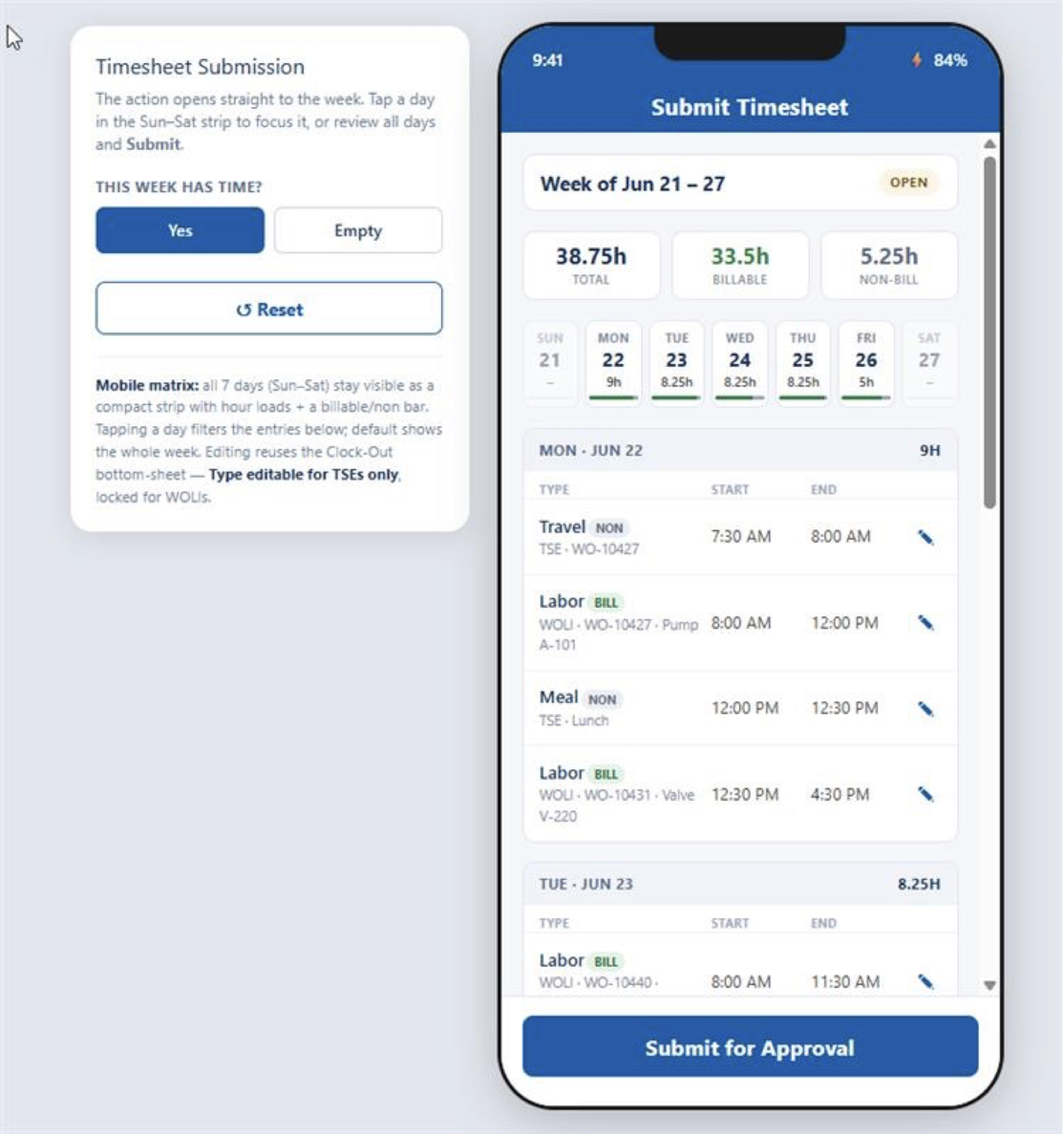
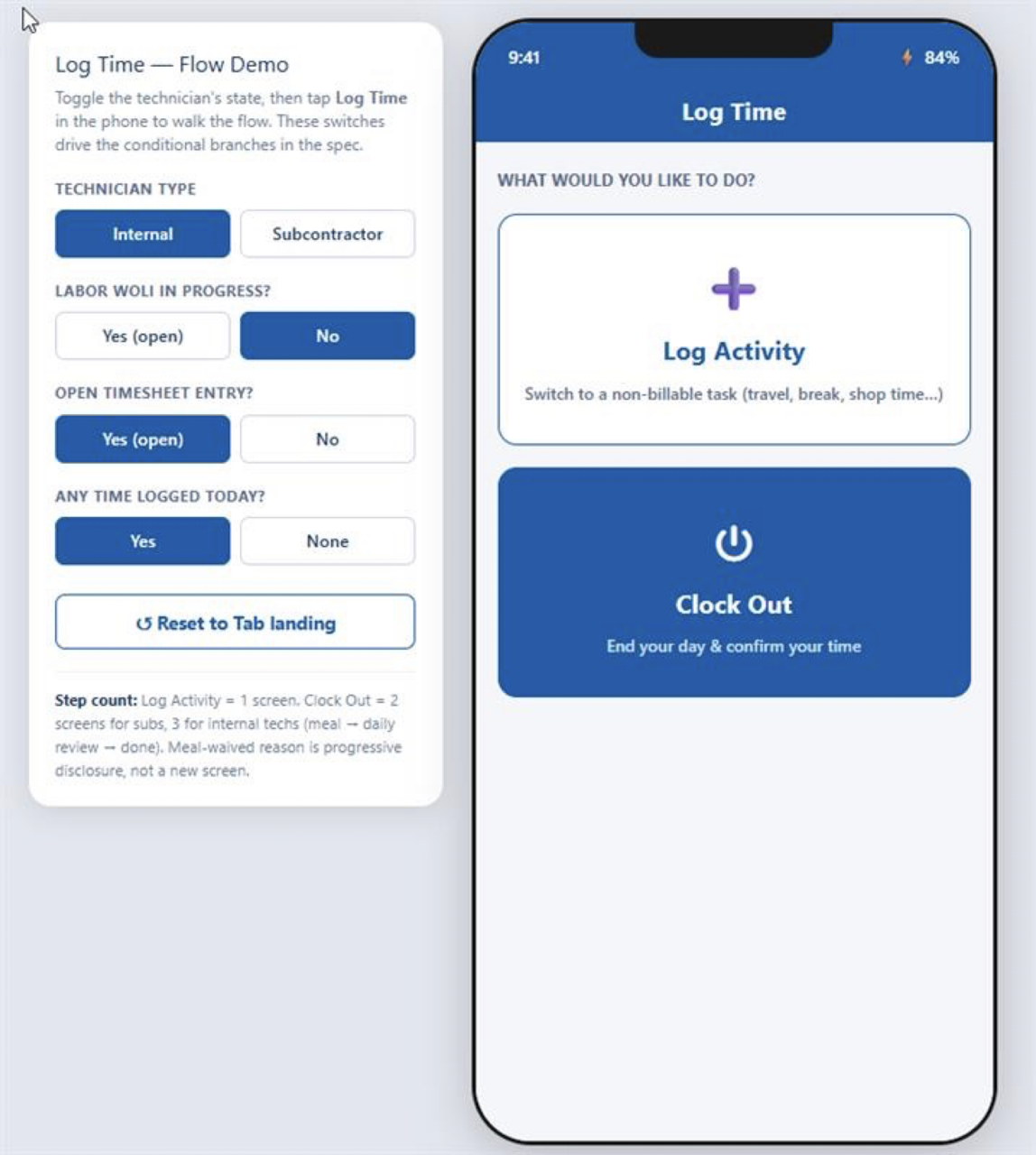
James’ field service UX prototype and client reaction
AI-assisted development has made this kind of rapid, high-fidelity experience work accessible in ways it wasn’t before. LWC development that previously required weeks of scaffolding and dedicated front-end resources can now be initiated in a single session. The same applies to headless experience architecture — Commerce Cloud storefronts, Experience Cloud sites, and embedded customer portals that once demanded specialist resources and extended timelines are now buildable within the scope of a standard engagement, for a fraction of what they once required.
What that unlocks isn’t just speed. It’s the ability to show clients what they’re getting — not describe it — before the build is locked in. In change management terms, that’s the difference between asking an organization to trust a specification and giving them something to react to. The latter produces better designs, better-prepared users, and more confident adoption at go-live.
When the design is visible early, training conversations are different. End users aren’t encountering the system for the first time in UAT. They’ve already shaped it. That’s a different kind of readiness — and it’s the kind that holds.
4. Designing across systems you don’t have access to
Most of our manufacturing clients run Salesforce alongside a manufacturing ERP, a human resources information system (HRIS), a Product Information Management (PIM) tool, and a forecast engine no one wants to touch. The data has to flow between all of it, and many of our engagements include integrations where ForeFront doesn’t have an org of our own to test in.
Bhavna Bhagchandani, our Solution Architect Team Manager, ran into this on a recent integration. Inventory updates lived in one system, time tracking lived in another, and the data had to round-trip both ways without breaking either. Historically, that means a partner contact, a 48-hour turnaround, and a discovery session that’s half education.
She used AI to pressure-test the design up front. If the time sheet structure looked a certain way in Salesforce, would the HRIS system process it? If the ERP handled inventory increments differently than the docs suggested, what would change on the Salesforce side? Questions that used to require a partner contact and a two-day turnaround came back in 30 minutes. The work didn’t get easier; it just stopped waiting on someone else’s calendar.
“It’s like brainstorming with another solution architect who has the knowledge of that specific system,” Bhavna says. Behavior still gets verified with the client and the partner before anything ships. But the discovery sessions look different now. We walk in with sharper questions instead of education slides, and most of the time goes into design decisions rather than catching up on basics.
What changes is the confidence of the design — and the ability to anticipate how changes in one system ripple through the others before a single integration is written. For a manufacturing organization with multiple integration points on the roadmap, that confidence is foundational to a change management plan that can actually stick.
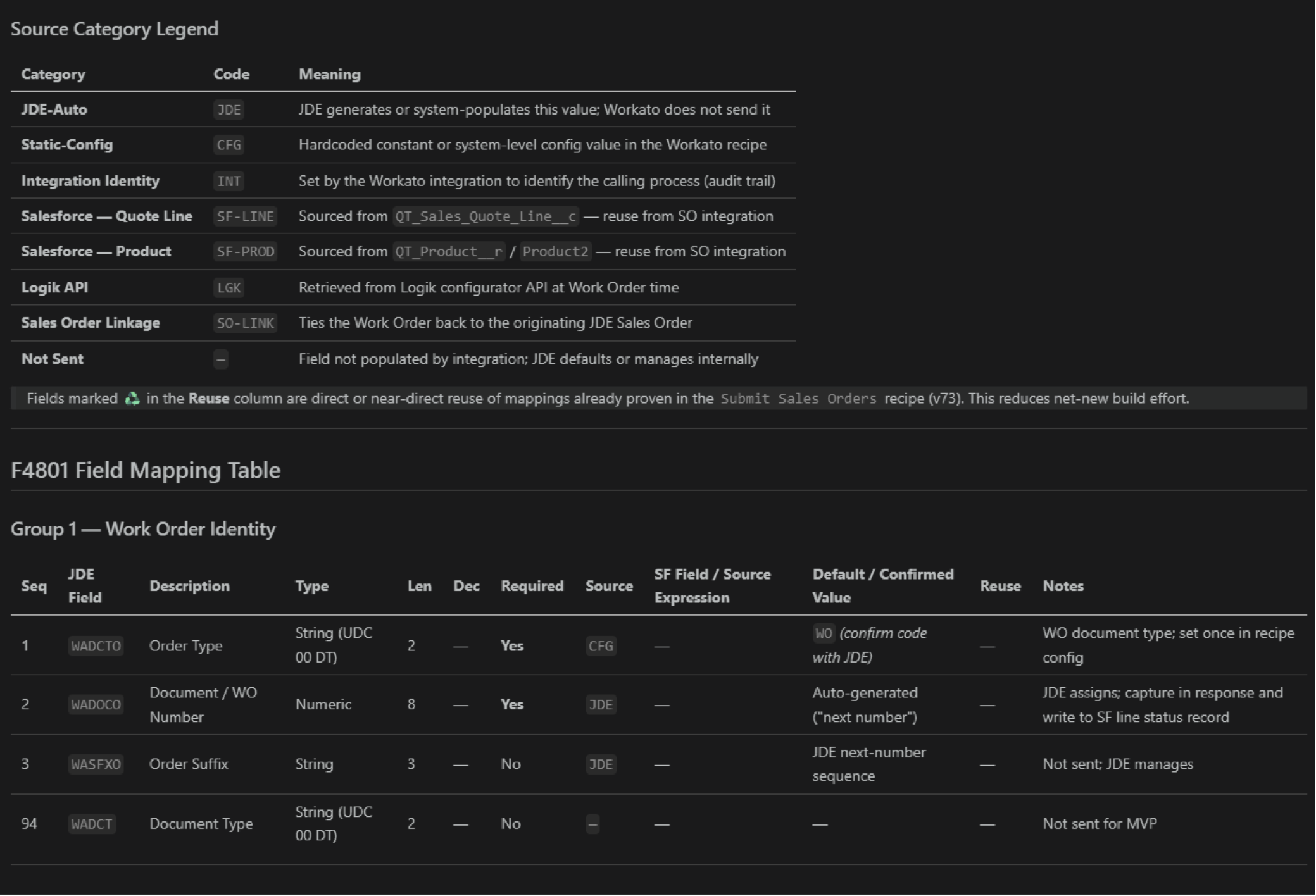
AI side-by-side comparison of Salesforce + ERP integration patterns in a single response
5. Catching gaps before they show up in testing
Most rework starts with gaps no one sees until User Acceptance Testing (UAT): a success criterion the solution doesn’t meet, a story that missed an edge case the client took for granted, or a solution that technically does what the story says without solving the actual business problem. Each gap is a moment where organizational trust in the project erodes.
Christian Taylor has built solution validation into how he drafts. Before writing anything, he pulls the story description, success criteria (SC), and proposed solution into one document. Then he runs it through AI looking for mismatches: SCs the solution skips, requirements that aren’t testable, places where an SC is missing entirely.
This approach helps us close gaps against known requirements early enough that the team has time for the unknown problems that surface in testing anyway. AI just gives us a second set of eyes.
For manufacturers, that means fewer surprises in UAT — and fewer moments where a stakeholder encounters something in testing that doesn’t match what they thought they’d approved. That disconnect, when it happens late, is where change management plans come apart. Catching it early is as much an organizational discipline as a technical one.
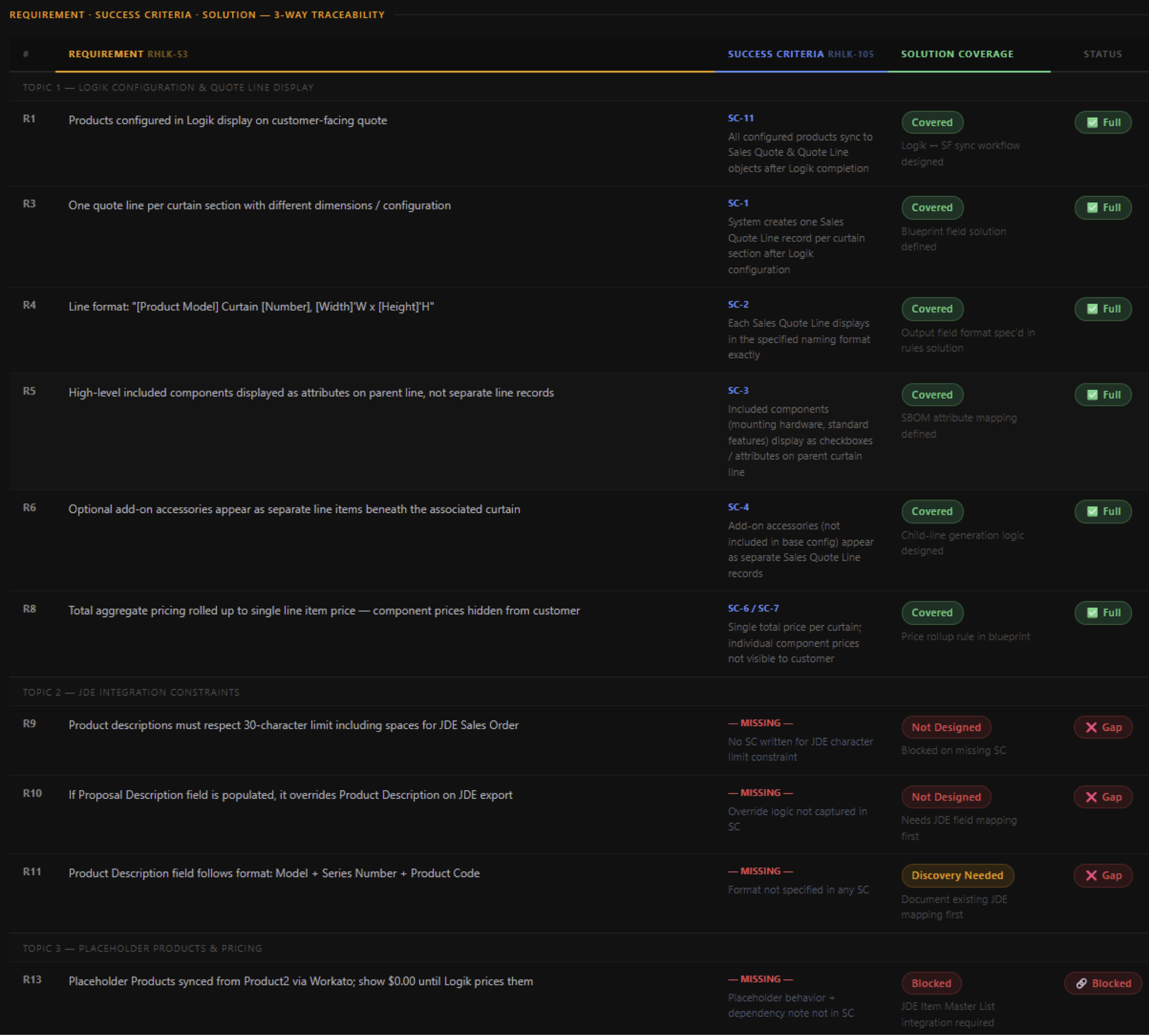
AI flagging a missing SC against a draft solution, with the suggested fix
What we’ve learned
As we’ve worked AI into the day-to-day, a few patterns hold across every use case:
- More context wins. A rich prompt that includes the user story, SCs, system specs, and prior decisions gives AI enough to actually pressure-test the design. The work of understanding the problem doesn’t go away; it’s what makes the prompt worth running. Prompts also need to include instructions about being concise, so that reviewing its output does not consume too much time
- You have to know what the answer should look like. AI supplements, not replaces, that judgment. AI is happy to invent a structure, a recommendation, or a process. If you don’t know what good looks like, it won’t either. We make decisions grounded in what we observe in the client’s business, then apply AI where it sharpens those decisions. The same judgment that tells us where AI strengthens our design work tells us where to leave it out.
- Treat AI as a co-pilot. As Solution Architects, we must treat it as a co-pilot — validating outputs against actual configurations, data, and especially security models. Effective use of AI isn’t about trusting it more; it’s about verifying it before acting.
- Human judgment remains non-negotiable. As a Solution Architect leading a greenfield implementation, experience and best practice becomes critical to every design decision. This is particularly true for greenfield or brand-new implementations. AI works from what it knows; in early project phases, it lacks the client context, stakeholder nuance, and business-specific constraints that shape a real solution. The discipline is in knowing when to trust the output and when to push back on it. AI compresses the time between “blank page” and “credible starting point” — and in a fast-moving implementation, that alone is a significant advantage.
- AI is not a mind reader. AI does not understand intent unless it is explicitly provided. When decisions are left open-ended or underspecified, AI will fill in the gaps based on patterns — not your goals — potentially leading to incorrect or misleading conclusions. Clear direction, constraints, and expected outcomes are critical to getting reliable results.
Why this matters for manufacturing leaders
A Salesforce implementation only delivers value if the organization it lands in is ready for it. The technical design has to hold. The integration has to be reliable. And the people using the system every day have to trust it.
AI has improved every part of that readiness. Discovery sessions focus on where the client wants to go — not on decoding what’s already there. Gaps get caught before users encounter them in UAT, before they erode organizational confidence in the project. Proofs of concept and working UX prototypes get into client hands early enough that stakeholders can react and refine, not just approve.
For manufacturing leaders, that means a partner who understands your current state more deeply before the first design session, a delivery process that surfaces problems before they reach your users, and an experience design approach that keeps end users at the center — not just at go-live.
Want to know more?
For information on how AI is changing the way we deliver Salesforce projects for manufacturing, contact ForeFront at marketing@forefrontcorp.com.
About the Authors
Bhavna Bhagchandani, Solution Architect Team Manager. Bhavna leads ForeFront’s Solution Architect practice and specializes in multi-system integration design across Salesforce, ERP, and HR platforms.
Christian Taylor, Solution Architect. Christian has deep experience in Data Cloud, MuleSoft, and multi-system integrations. He builds unified data architectures across ERP, CRM, and service systems, giving organizations the foundation they need for accurate reporting, automation, and AI.
Bryan Land, Solution Architect. Bryan holds 15 Salesforce certifications and experience spanning Manufacturing, Revenue, Service, Commerce, Experience, Health, and Automotive Clouds, and focuses on rapid prototyping and POC work directly in client orgs.
James Goodman, Salesforce Practice Director. James leads ForeFront’s Salesforce Practice with a focus on improving field service and revenue operations in manufacturing and HLS organizations.