

How Do Leaders Enable & Govern AI for Sales Teams?
By Bryan George | Salesforce Practice Director, ForeFront, an EPAM Company
Almost everyone in sales has embraced AI over the past few years. Early adopter or late bloomer, the pace of the job has picked up, and that pace has pushed sellers to lean harder on technology to keep up.
Multiple verticals, sprawling account coverage, near-constant pings spanning various channels, and days packed so tightly there’s no room to prepare (let alone breathe) have become the new norm, and I don’t see that changing anytime soon. Somehow, the time we’ve gained in productivity has just been filled with more things to do.
So, leaders are left with three questions. How are sales teams using AI today? How do we govern it? And how do I make it efficient, with cost controls that keep AI spend from running away?
Where Sales Teams Use AI Today
In my experience, sales teams lean on AI in three main places, with a fourth catching up fast.
- Preparation and research. Before any human interaction, there’s a company, a technology, an industry, or a person to understand, and a hypothesis to form about the problem the buyer is trying to solve. The more we know, the smarter we sound and the faster we build trust. AI is a huge accelerator for prospecting.
- Communication. Sales runs on volume, especially in business development. Not every message needs AI, but most large language models (LLMs) can polish rough writing in seconds, and they’ll generate a first draft when writer’s block sets in.
- Content output. The days of a few words on a slide and a spreadsheet of numbers are over. Proposals, questionnaires, introductions, and sell sheets all need to be polished enough to grab attention, because buyers have less of it to give than they used to.
- Coaching and training. This is the area I see growing fastest. Prompted well, today’s models give useful feedback on how a seller frames a message, prepares for a call, or answers a difficult question.
That isn’t an exhaustive list. Idea generation, strategy, and just about any repeatable task are fair game, and your sellers are probably using AI for them already.
Your Sales Team Is Already Using AI
Whether you signed off on it or not, your sellers are using these tools. Sorry, not sorry. The market is driving this, and to maintain a competitive advantage and make quota in an increasingly tough environment, they must use something.
Often that means turning to unsanctioned tools, either because the company doesn’t provide what they need or because what it does provide is too clunky to be useful.
I know what you’re thinking: “We have IT policies that block those sites.” Good. You should absolutely have governance in place. But if you believe a blocked URL keeps your team away from ChatGPT, Claude, Gemini, or any of the dozens of other options, you’re mistaken. If it’s blocked on the corporate network, they’ll pick up a personal device. Sellers have a vested interest in bringing in business, and most will do whatever it takes to close it.
So, treat this less as a policy violation and more as a signal. The better question is what you should be doing differently to enable your selling teams.
Enable First, Then Govern
The key to enabling your team is giving them the tools they need.
Just about every application on the market has an agent attached to it now. Those agents are usually purpose-built, so what one does well, another doesn’t. The agents your finance team needs look nothing like the ones your sales team needs.
This is where enterprise platforms earn their place. Purpose-built agents on major platforms are generally safe and effective at specific, prescriptive work. Take Agentforce in Sales Cloud: it ships capabilities for inbound activity, outbound activity, sales coaching, and pipeline management. Because those agents are grounded in your customer relationship management (CRM) data, there’s no hunting for information, and the data stays inside the platform’s security model.
I’ll be candid, though: it’s not enough on its own. If that were all I had, I’d still end up in external tools. Sales is dynamic, and I need a flexible, chat-style interface for everything that comes up in a day, like:
- Translate this scoping call into answers on a questionnaire
- Give me ideas for a new go-to-market (GTM) workshop around Marketing Cloud
- Summarize this call into notes
- Draft a few angles for a LinkedIn post
- Cowork a PowerPoint deck custom tailored to the client’s environment and use case
All of those can land on the same afternoon. That’s where AI for sales gets interesting. Prebuilt agents on the number one CRM, handle specific sales activities extremely well, and sellers also need a flexible coworking environment for the long tail of tasks that fill their day.
The goal shouldn’t be to lock users into one tool. Sellers need to be nimble and have the flexibility to do their job while the organization keeps the right security and governance model in place. A platform like Salesforce helps here, because customer data and business processes stay inside an enterprise security model while users still get real AI capability.
At ForeFront, we use Claude Cowork heavily, and I don’t need outside tools for anything I do day to day. It’s connected to Salesforce and our SharePoint tenant, and the answers I get are far more useful than anything an unconnected consumer tool gives me. That combination matters: the interface has to be flexible enough for the seller, while the data and security behind it stay governed by the organization.
That’s also why one announcement from Dreamforce ’26 caught my attention. Salesforce and Anthropic introduced Claudeforce, which brings Salesforce directly into Claude with 37 prebuilt sales skills for work like meeting prep, deal health reviews, and pipeline reviews. Claude works within each user’s existing Salesforce permissions, so sellers only see what they’re already allowed to see. It’s still in open beta, but it’s a clear sign of where the market is heading: a flexible interface for the seller, governed by the organization’s security model.
Vet the Vendor Before You Hand Over Your Data
New AI tools show up every day, and too often business users adopt them without vetting the company behind them. Before anyone on your team connects a new tool, someone should be able to answer three questions:
- 1How do we know our data is safe?
- 2Who or what will be accessing our data?
- 3How long has this company been around?
The growth in AI vendors has been remarkable. Stanford’s AI Index identified 1,392 newly funded AI companies worldwide in 2022, and estimates today put the total in the tens or even hundreds of thousands. The churn is real too: AI companies made up roughly 16% of all startup shutdowns in 2025, according to SimpleClosure’s State of Startup Shutdowns report.
And the tools that do survive don’t always pay off. MIT’s NANDA initiative found that about 95% of enterprise generative AI pilots delivered no measurable impact on the P&L in its 2025 GenAI Divide report. How companies adopted AI made a big difference: buying tools from specialized vendors or building with partners succeeded about 67% of the time, while projects built entirely in-house succeeded only about a third as often.
That should give any organization pause before betting on a new entity, and it raises a fourth question worth asking every vendor: what happens to our data if you go under?
Governance deserves its own post. For this one, the point is simple: build a structure with enough flexibility for your sellers to use the technology while staying inside the governance model you’ve set up.
Controlling Costs Without Slowing Sellers Down
So how do you enable your team and still keep spend in check?
Start with the nature of sales. It requires a human element, because purchasing decisions, personal or business, are often emotionally driven. AI is improving faster than anyone expected, but it still can’t pick up on the subtle human cues in a buying decision that a good salesperson reads instinctively. That means there will almost always be a human in the loop when we put AI in front of a sales team.
That human-in-the-loop model is what people mean by coworking. The seller evaluates outputs, tweaks them, and steers along the way, which is very different from a fully agentic process where agents that run on their own are governed and monitored, not unsupervised.
The catch is cost variability. Token usage can swing widely from one user to the next, and even from one prompt to the next for the same user. The harder the model has to think, the longer it runs and the more tokens it burns.
The good news is that most of what sellers ask AI to do is easy work for a good model. Sales teams were early adopters, so model providers had every reason to make those everyday tasks efficient. Usage still adds up, though, and complex mockups, demos, or heavy visuals can drive it up quickly.
This is also where an experienced partner earns its keep. A partner that has rolled out AI across other sales organizations knows where usage spikes, which use cases justify the spend, and how to size licenses and limits before you commit, so your AI budget is predictable instead of a surprise at the end of the quarter.
Three guardrails help:
- Set a usage limit. Give everyone a weekly limit. Some roles may get more, but anywhere a human is in the loop, you need a throttle. Make one-off exceptions when they’re warranted, otherwise set a standard and stick to it.
- Expose the meter. Most people understand that these tools cost money based on usage. Showing them what they’ve consumed changes behavior. “You can use 1,000,000 tokens a day” means very little; “I’ve got $75 for the week, and that last query ate $30” lands immediately. People think in dollars, not tokens, so make the cost as clear as you can.
- Train sellers on best practices. Seasoned AI users and late bloomers alike need training and reminders. How a prompt is written has a dramatic effect on what the response costs.
Illustrative example. Dollar figures are hypothetical.
What a Better Prompt Looks Like
Compare these two requests:
Illustrative. Actual variation depends on how many data sources the model is connected to.
If your model is connected to multiple data sources, and it should be, the first prompt sends it searching across all of them while the second hands it exactly what it needs. In my experience, token usage between prompts like these can vary by 30X or more.
It’s easy to get sloppy. Sales moves fast, and if a seller can hand a task to an agent and go knock out three other things while it runs, they will. Help them manage it with regular reminders about best practices and their own usage and make it an open conversation across the department rather than a quiet shadow IT policy.
What This Means for Sales Leaders
In short, you need to embrace this change if you haven’t already. Every day without an AI strategy puts you a step behind competitors who have one.
We typically see two personas: planners and builders. Planners are stuck in analysis paralysis and struggle to move forward. Builders move so fast they overlook security and governance. Neither gets you where you need to be.
Succeeding here takes both halves: embrace the change, and put policy in place to govern it. Whether each seller leans into the technology is up to them. Your job as a leader is to make sure the organization is ready, with the tools, the guardrails, and the framework to govern the change as it unfolds.
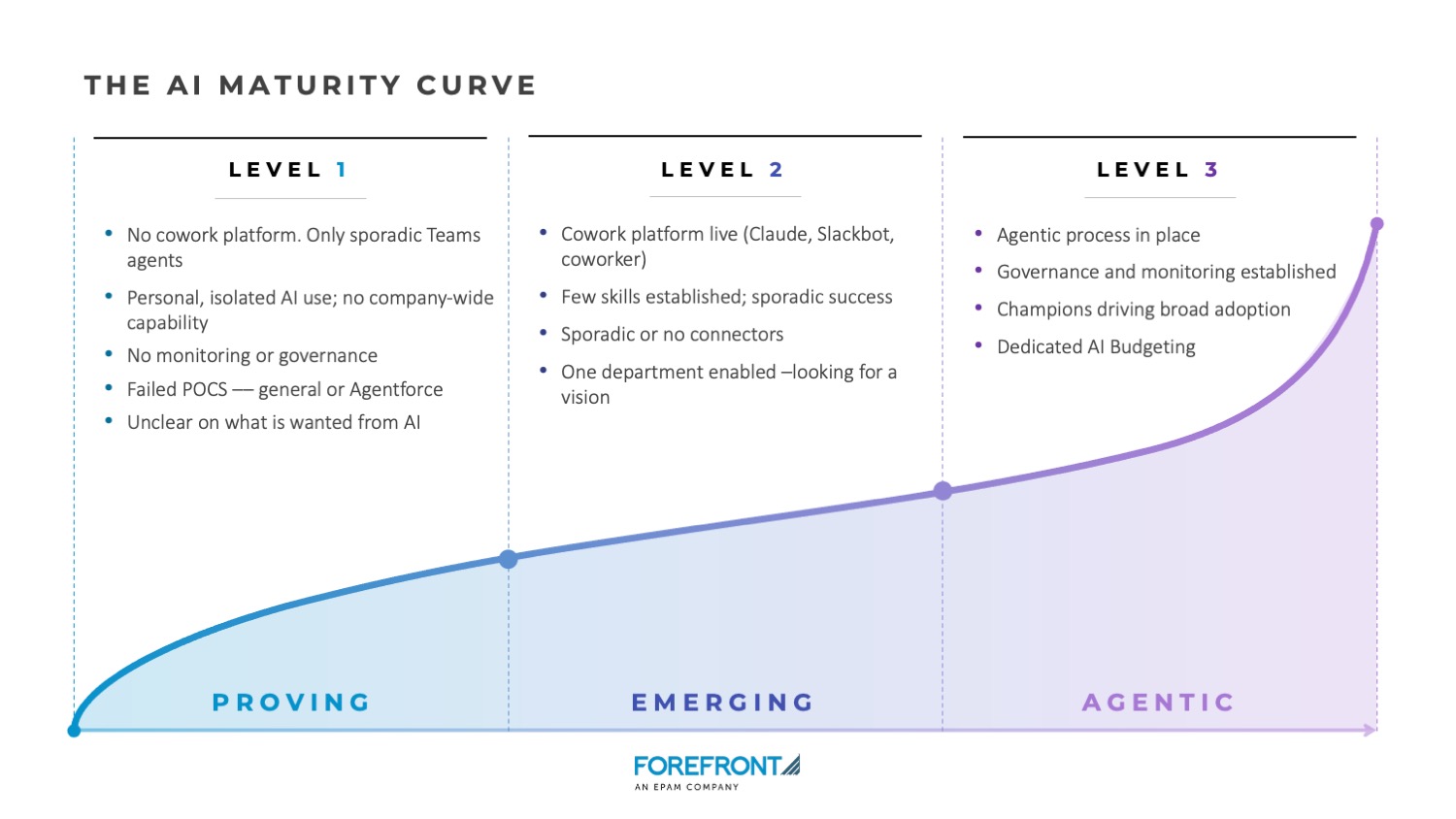
Our AI maturity curve shows why. Planners tend to stall at Level 1, Proving: personal, isolated AI use, no monitoring or governance, failed proofs of concept, and no clear picture of what the business wants from AI. Builders race to Level 2, Emerging, with a Cowork platform live and one department enabled, but they skip the foundation that Level 3 requires. The organizations that reach Level 3, Agentic, have agentic processes in place, governance and monitoring established, champions driving broad adoption, and a dedicated AI budget. That’s the same mix of enablement, governance, and cost control this post has been arguing for.
If you’re not sure where to start, pick one thing this week: find out which AI tools your sellers are using today, sanctioned or not. That list is the first draft of your enablement plan.
Want to know more?
For information on how AI is changing the way we deliver Salesforce projects, contact ForeFront at marketing@forefrontcorp.com.
About the Author
Bryan George is a Salesforce Practice Director at ForeFront, an EPAM company. He has more than 15 years of experience in sales operations and Salesforce consulting, and he pairs sales leadership with deep technical expertise. As a seller who relies on AI every day, he knows what sales teams need from these tools and what leaders need to keep them secure and cost-effective. Want to learn how ForeFront helps sales organizations enable and govern AI with Agentforce, Claude, and Salesforce? Explore our solutions here.